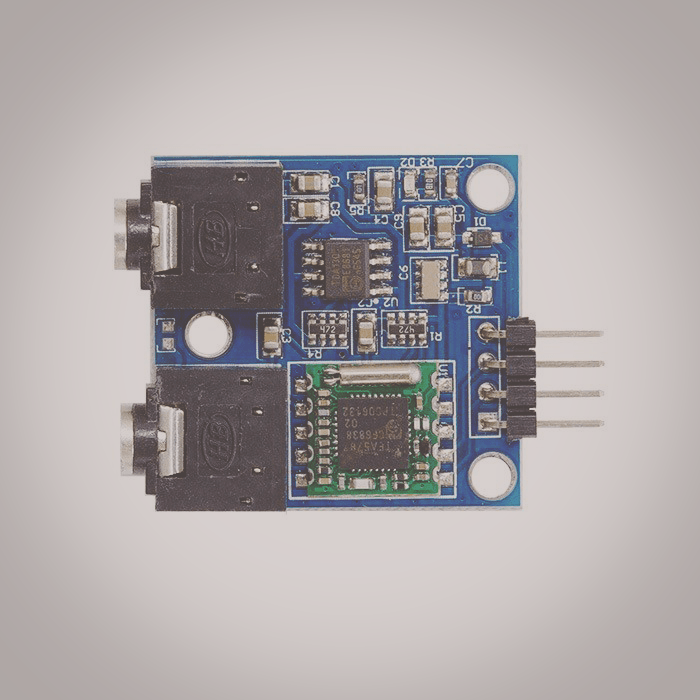
Basic tutorial of how to setup a FM Radio Module (tea5767) with the Raspberry Pi.
PARTS:
RPI 3 B+ – https://amzn.to/2DcfywB
4 Amp Power Adapter – https://amzn.to/2Q77KPL
16GB Micro SD – https://amzn.to/2DaPZMF
FM Module – https://ebay.to/2CUeUmL
(ALT) FM Module – https://amzn.to/2DfDShp
SCHEMATIC:
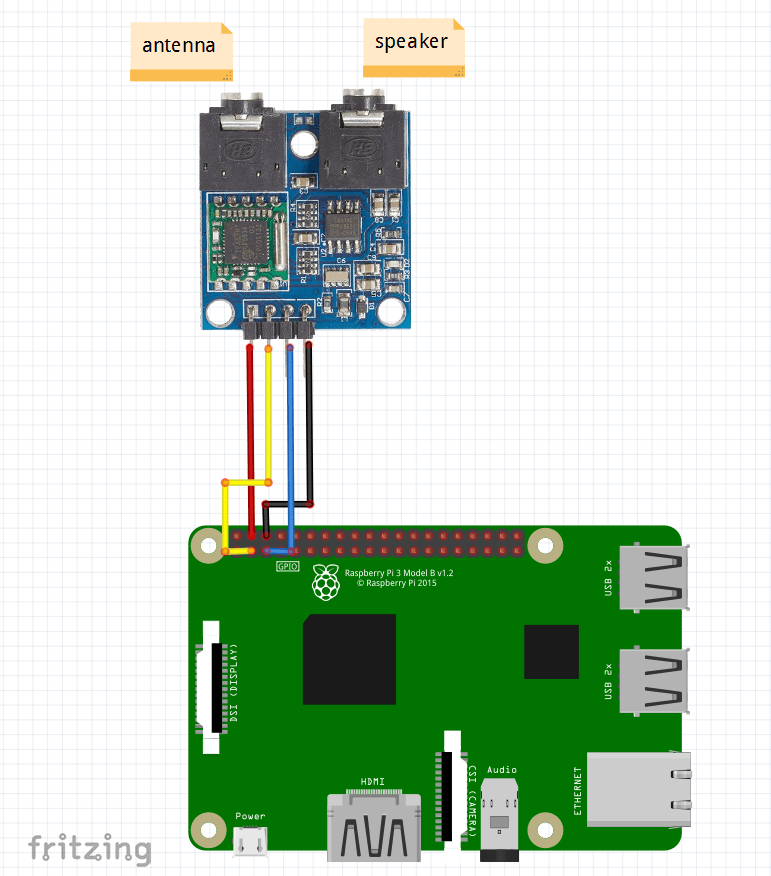
5V >> 5V
SDA >> GPIO2
SLC >> GPIO3
GND >> GND
SETUP:
Enable I2c interface:
Type
sudo raspi-config
Select “Interfacing Options”
Select “I2C”
Select “Yes”
Save and Exit
Verify Module is detected:
sudo i2cdetect -y 1
You should see 60 in column 0
CODE:
#!/usr/bin/python3
#Reference code obtained from "https://www.raspberrypi.org/forums/viewtopic.php?t=53680" by user: LinuxCircle
import smbus as smbus
import subprocess
import curses
import curses.textpad
import time

i2c = smbus.SMBus(1) # newer version RASP (512 megabytes)
i2c_address = 0x60

def init_radio(address):
    """initialize hardware"""
    i2c.write_quick(address)
    time.sleep(0.1)


def set_freq(address, freq):
    """set Radio to specific frequency"""
    freq14bit = int (4 * (freq * 1000000 + 225000) / 32768) # Frequency distribution for two bytes (according to the data sheet)
    freqH = freq14bit>>8 #int (freq14bit / 256)
    freqL = freq14bit & 0xFF

    data = [0 for i in range(4)] # Descriptions of individual bits in a byte - viz.  catalog sheets
    init = freqH # freqH # 1.bajt (MUTE bit; Frequency H)  // MUTE is 0x80
    data[0] = freqL # 2.bajt (frequency L)
    data[1] = 0xB0 #0b10110000 # 3.bajt (SUD; SSL1, SSL2; HLSI, MS, MR, ML; SWP1)
    data[2] = 0x10 #0b00010000 # 4.bajt (SWP2; STBY, BL; XTAL; smut; HCC, SNC, SI)
    data[3] = 0x00 #0b00000000 # 5.bajt (PLREFF; DTC; 0; 0; 0; 0; 0; 0)
    try:
      i2c.write_i2c_block_data (address, init, data) # Setting a new frequency to the circuit
      print("Frequency set to: " + str(freq))
    except IOError:
      subprocess.call(['i2cdetect', '-y', '1'])


def mute(address):
    """"mute radio"""
    freq14bit = int(4 * (0 * 1000000 + 225000) / 32768)
    freqL = freq14bit & 0xFF
    data = [0 for i in range(4)]
    init = 0x80
    data[0] = freqL
    data[1] = 0xB0
    data[2] = 0x10
    data[3] = 0x00
    try:
        i2c.write_i2c_block_data(address, init, data)
        print("Radio Muted")
    except IOError:
        subprocess.call(['i2cdetect', '-y', '1'])


if __name__ == '__main__':
    init_radio(i2c_address)
    frequency = 101.1 # sample starting frequency
    # terminal user input infinite loop
    stdscr = curses.initscr()
    curses.noecho()
    try:
        while True:
            c = stdscr.getch()
            if c == ord('f'): # set to 101.1
                frequency = 101.1
                set_freq(i2c_address, frequency)
                time.sleep(1)
            elif c == ord('v'): # set to 102.1
                frequency = 102.1
                set_freq(i2c_address, frequency)
                time.sleep(1)
            elif c == ord('w'): # increment by 1
                frequency += 1
                set_freq(i2c_address, frequency)
                time.sleep(1)
            elif c == ord('s'): # decrement by 1
                frequency -= 1
                set_freq(i2c_address, frequency)
                time.sleep(1)
            elif c == ord('e'): # increment by 0.1
                frequency += 0.1
                set_freq(i2c_address, frequency)
                time.sleep(1)
            elif c == ord('d'): # decrement by 0.1
                frequency -= 0.1
                set_freq(i2c_address, frequency)
                time.sleep(1)
            elif c == ord('m'): # mute
                mute(i2c_address)
                time.sleep(1)
            elif c == ord('u'): # unmute
                set_freq(i2c_address, frequency)
                time.sleep(1)
            elif c == ord('q'): # exit script and cleanup
                mute(i2c_address)
                curses.endwin()
                break
    except KeyboardInterrupt:
        mute(i2c_address)
        curses.endwin()
Oh! Really thanks for this post. I watched your video in Youtube.
I want to schedule recording a specific station using your python script. Is there any Python library for that? Of course I could find it by long googling, if you already know. I wanna take some help from you.
I think you could try plugging the 3.5mm output from the tea5767 into the RPI (possibly use a cheap RPI USB audio adapter). Then you could just record the input using the “arecord” command.