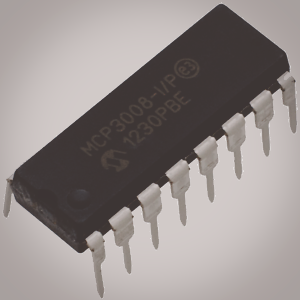
Basic tutorial of how to setup an Analog to Digital Converter with the Raspberry Pi.
PARTS:
RPI 3 – https://amzn.to/2VA9pQY
4 Amp Power Adapter – https://amzn.to/2CTptWu
16GB micro SD – https://amzn.to/2SFMwd3
120 pcs jumper cable: https://ebay.to/2VAb9cY
Breadboard – https://amzn.to/2H1ekHs
breadboard jumper cables: https://amzn.to/2D9HXlD
mcp3008 chips: https://amzn.to/2RP7Orj
(optional) touch sensor: https://amzn.to/2D8RYj1
SCHEMATIC:
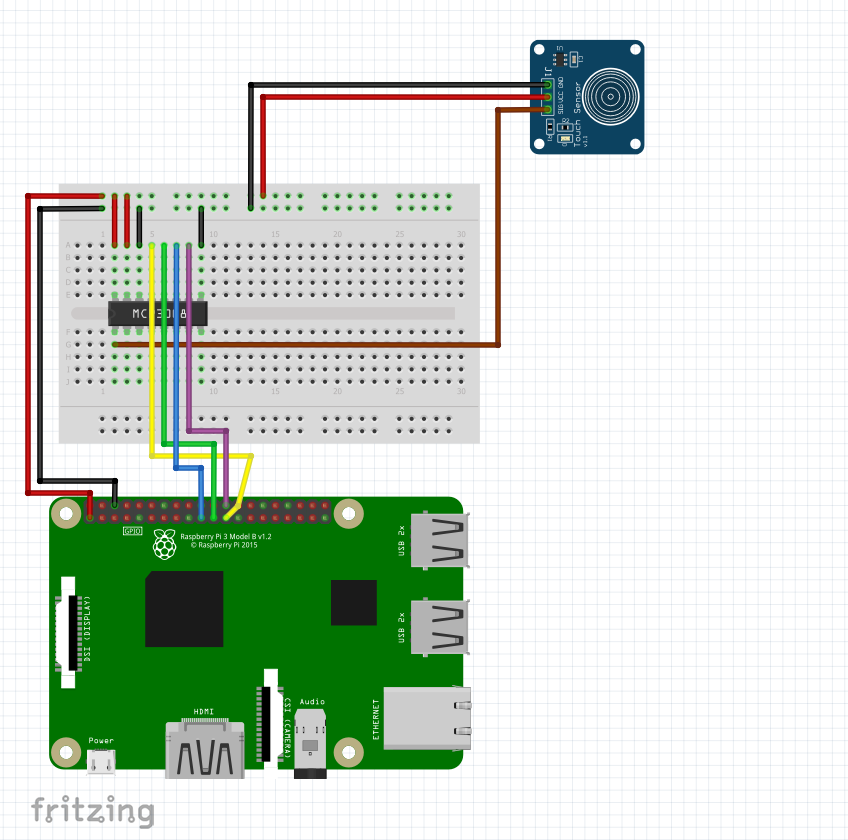
Adafruit Tutorial: https://learn.adafruit.com/raspberry-pi-analog-to-digital-converters/mcp3008
CODE:
Adafruit Github: https://github.com/adafruit/Adafruit_Python_MCP3008.git
import time

# Import SPI library (for hardware SPI) and MCP3008 library.
import Adafruit_GPIO.SPI as SPI
import Adafruit_MCP3008

timeout = 1.5
last_touch = 0
# Software SPI configuration:
# CLK  = 18
# MISO = 23
# MOSI = 24
# CS   = 25
# mcp = Adafruit_MCP3008.MCP3008(clk=CLK, cs=CS, miso=MISO, mosi=MOSI)

def test():
    print("Touch Detected")

# Hardware SPI configuration:
SPI_PORT   = 0
SPI_DEVICE = 0
mcp = Adafruit_MCP3008.MCP3008(spi=SPI.SpiDev(SPI_PORT, SPI_DEVICE))

print('Press Ctrl-C to quit...')
while True:
    # Grab the difference between channel 0 and 1 (i.e. channel 0 minus 1).
    # Note you can specify any value in 0-7 to grab other differences:
    #  - 0: Return channel 0 minus channel 1
    #  - 1: Return channel 1 minus channel 0
    #  - 2: Return channel 2 minus channel 3
    #  - 3: Return channel 3 minus channel 2
    #  - 4: Return channel 4 minus channel 5
    #  - 5: Return channel 5 minus channel 4
    #  - 6: Return channel 6 minus channel 7
    #  - 7: Return channel 7 minus channel 6
    value = mcp.read_adc_difference(0)
    print('Channel 0 minus 1: {0}'.format(value))
    if value > 0 and last_touch + timeout < time.time():
        test()
        last_touch = time.time()
    time.sleep(0.5)